Turning a major operational change, a new booking system, and a state-by-state rollout into one clear buying experience for The Good Guys
MY ROLE
I led the UX across the product page, cart, and Shopify checkout, and helped shape the confirmation page. A big part of the job was connecting the dots between teams, taking requirements from product, engineering, merchandise, and Home Services and turning them into one clear flow. I also designed within real limits, including Shopify's checkout and a new Salesforce booking system, and kept the experience consistent even where the back end worked differently by region or delivery type.
THE GAP I WAS SOLVING
Before designing anything, I used Google Analytics and Microsoft Clarity to understand how customers actually behaved, rather than relying on assumptions. One clear gap stood out: installation wasn't communicated during checkout at all. With a two-visit model now in play, many could reach the end of their purchase with no idea a second visit was coming. The same gap held an opportunity, since buying a TV often needs things people forget until install day, like a wall bracket, longer cables, or cable hiding. Surfacing these as add-ons at the right moment, and making installation clear through checkout and confirmation, became the heart of the project.
PROBLEM
This was more than a design refresh. Installations were moving to a separate team, so delivery and install became two visits instead of one. The whole flow had to connect to a new Salesforce booking system, all inside Shopify, which is hard to customise. The rollout was also phased state by state, some areas had no install coverage, and a single order could be delivered in several different ways. The design had to handle all of this and still feel easy for someone just buying a TV.
PROBLEM STATEMENT
How can we update the end-to-end TV delivery and installation journey to feel frictionless, surfacing add-ons and supporting them well after purchase?
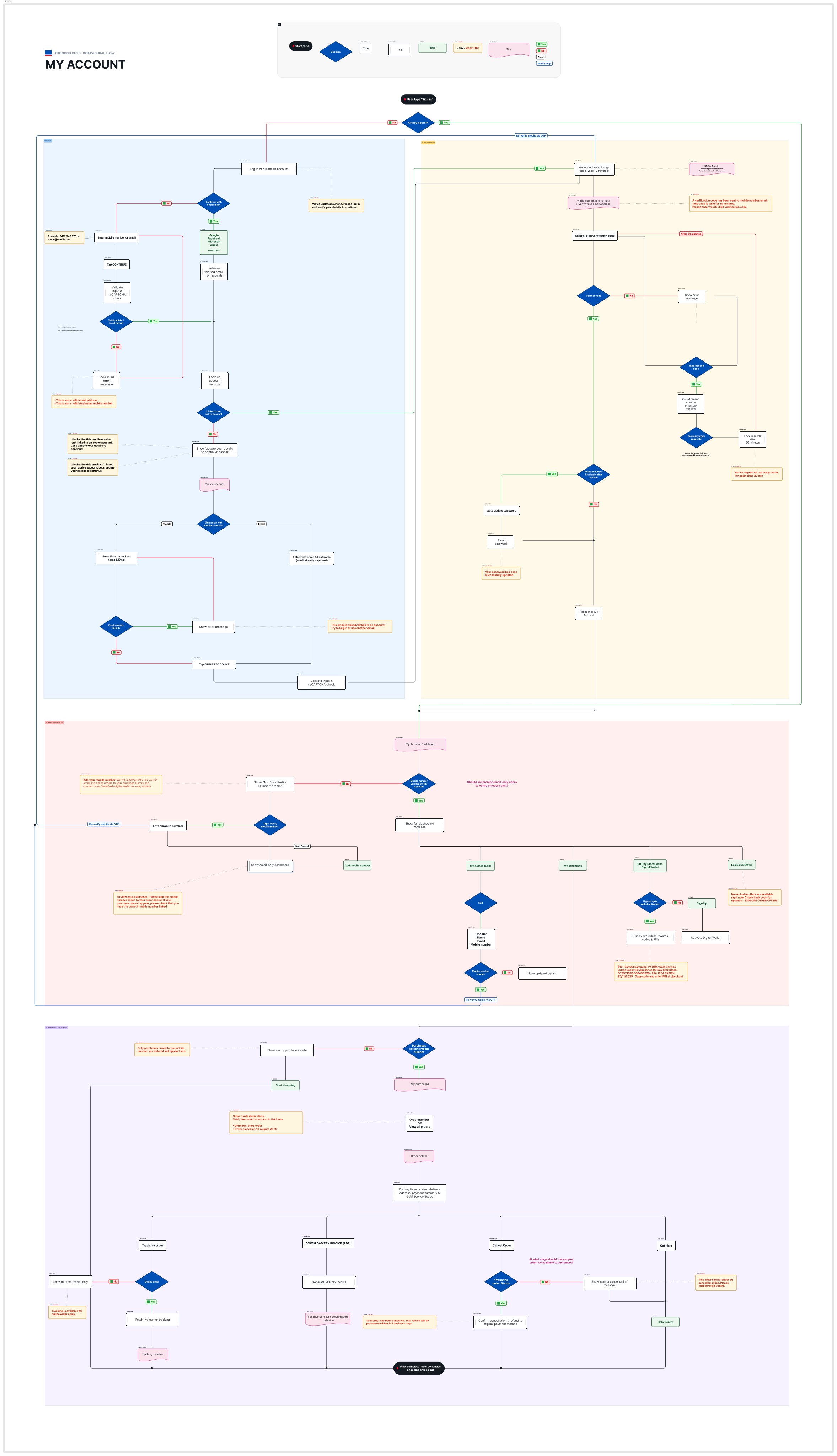
BEHAVIOURAL FLOW
Authentication
The My Account experience supports three sign-in methods: mobile number, email address, and social SSO via Google, Facebook, Microsoft, and Apple. All paths converge at a single account lookup that determines routing. Unrecognised credentials trigger an account creation flow, while returning users are routed directly into OTP verification, where a time-bound six-digit code is issued via SMS or email. A resend throttle caps attempts within a 20-minute window, with progressive error states surfaced at each failure point.
Dashboard
Once authenticated, the dashboard renders conditionally based on profile completeness. Email-only users see a restricted view, with purchase history and StoreCash access gated behind a mobile verification prompt. Users with a verified mobile number land on the full dashboard, surfacing four modules: personal details, purchase history, the 90 Day StoreCash Digital Wallet, and exclusive offers.
Purchase History and Order Management
Each order exposes a set of context-sensitive actions: live carrier tracking for online orders, tax invoice downloads, and conditional cancellation based on fulfilment status. Dispatched orders are locked from self-service cancellation and redirected to the Help Centre. Any change to a verified mobile number mid-session triggers a return to OTP verification before the update is saved.
SIGNING IN
One way in
Sign In call to action is a single entry point that covers both logging in and creating an account, they are essentially the same journey. Users can sign in with either mobile number, email or social login and the system works out the rest, it checks whether you already have an account and sends you down the right path.
Designing for migration
At its core this is a migration flow. If you were a TGG member before we changed platforms, this is what you get the first time you come back. The bigger win was using that same flow to simplify things for new and returning users too. It's really one path with a few small tweaks rather than three separate journeys, the OTP (One-Time Password) approach made that possible.
Why mobile number leads
The biggest structural decision was building the flow around the mobile number. It's our main identifier, because that's where purchases live, buy something in store or online, and we tie it to your number. That makes it far more than a login field; it's the link to your entire purchase history and your benefits.
Fewer steps to My Account
Returning customers run on the same OTP logic. They verify their mobile, email, or a linked social account, skip create-account screen and go straight into My Account.
DESIGN CHALLENGES
Passwordless at scale. Most Australian shoppers were used to logging in with an email and password. Moving to OTP-only meant every step needed clear, reassuring copy about why we were asking for a mobile number and what it would unlock.
Making verification feel worthwhile. Verifying a mobile number was the gateway to purchase history and StoreCash. The design needed to frame this as a reward, not a requirement, so users could immediately see what they would gain by doing it.
Account setup from the order confirmation page. Customers who placed an order without an account could set up their account directly from the confirmation page. Pre-filling their name from the order reduced friction and helped more people complete the setup.
Connecting identities without creating duplicates. Social login users who later added a mobile number needed their accounts correctly linked in B2C, without accidentally creating duplicate accounts or giving access to someone else's wallet.
01
Enter identifier
Mobile, email or social
02
OTP verification
6-digit code, 10 min expiry
03
Account check
Existing vs new user
04
Dashboard
Orders, StoreCash and more
DASHBOARD DESIGN
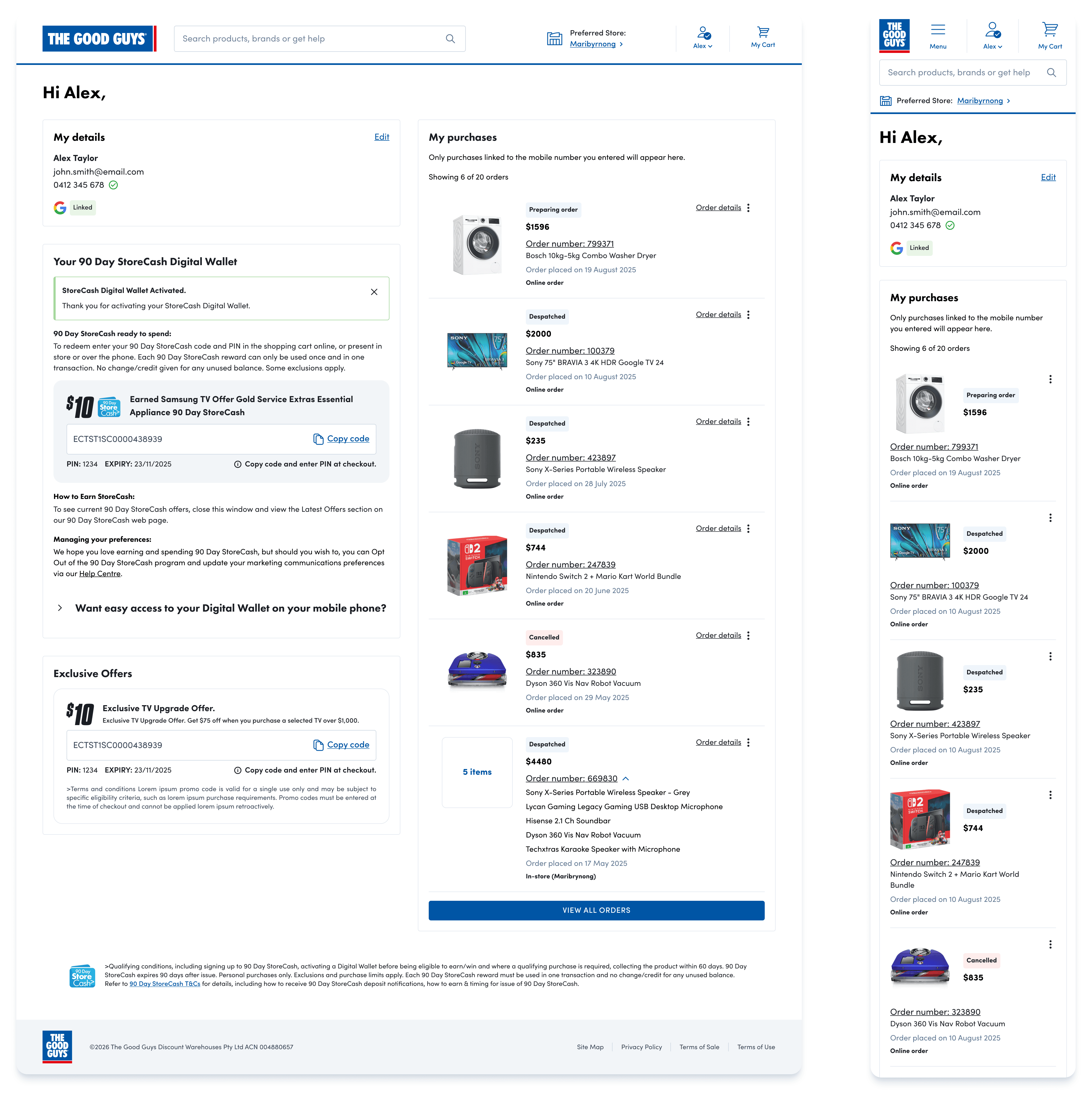
The My Account dashboard was designed around five core sections: personal details, StoreCash offers, exclusive member offers, purchase history, and a mobile verification prompt for users who hadn't yet unlocked full benefits. The purchase history component surfaces the 10 most recent orders on load (5 on mobile), with order status, product images, and inline tracking links, reducing the need for support contact.

Status badges – A shared start and shared closed states, with only the genuinely different steps kept in each path. When one purchase has multiple deliveries, the badge reads "Multiple items" and the order details track each one. Ideally In-Store orders would carry their own badge, but a legacy constraint and fixed copy ruled that out — the goal was helping users quickly grasp what they bought and where it is.

Track your order – The plain version without logos is used for big & bulky items (furniture & large appliances), which ship via booked delivery that isn't parcel-tracked, so there's no number in preview, just a link to manage it. The others are for parcelised items, where the customer can choose between delivery options, each showing the relevant carrier and either an inline tracking number or live driver tracking.
MY PURCHASES
Order History
Over 80% of orders are single items, so the list is optimised for that default. Multi-item orders needed a pattern that stayed consistent with the single-item layout rather than breaking it. Each multi-item order uses one the amount of items per purchase as image and a "Multiple Items" badge, keeping every row scannable at the same height.
Expandable Details
The item list sits behind a dropdown for multi items under the order number. Expanding it reveals every product in the order on demand. This also surfaces Gold Service Extras (GSE) The Good Guys' warranty, directly against the product it was purchased with, so coverage is tied to the right item.
Details Panel
Over 80% of orders are single items, so the list is optimised for that default. Multi-item orders are the exception, and they needed a pattern that stayed consistent with the single-item layout.
Orders also span multiple fulfilment types like big & bulky, in-store, click & collect, etc and a single account can hold several of them at once, each at a different stage. To handle that range, I built a modular system: a set of components that configure to any order type and status combination, so every change reads consistently without bespoke layouts.
THE IMPACT
New registrations
389,670
since go-live on Shopify
Growth rate
4.3x faster
than the legacy platform
Primary sign-in method
94%
mobile or email vs 6% social
Top social provider
13,252 sign-ins, 95% of all social logins
The old My Account took 14 years to reach 1.37 million users, around 97,857 per year. The new Shopify experience is growing at around 423,550 users per year, which is 4.3x faster. Most users chose to link both their email and mobile number, which showed that framing verification as a reward rather than a requirement really worked.
KEY LEARNINGS
The numbers backed up what we set out to do. With 283,742 users linking both email and mobile, the idea of treating verification as a value exchange paid off. When people understand what they get in return, they are much more likely to take the extra step.
Working within Azure B2C's technical limits pushed me to collaborate with engineers from the very start, which helped us find solutions that felt simple to users even when the back-end was complex. While we did not have component-level analytics at launch, the overall growth data gave us a strong signal that the new experience is working. More detailed tracking is now being built in to help us keep improving.